Physical Address
304 North Cardinal St.
Dorchester Center, MA 02124
Physical Address
304 North Cardinal St.
Dorchester Center, MA 02124


Want to create a WordPress sitemap that boosts your website’s SEO? A WordPress sitemap can help search engines crawl and index your website more efficiently. Follow our simple step-by-step guide using Rank Math SEO for maximum impact.
Sitemap, often termed as XML sitemaps or HTML sitemaps are the way to tell search engines about the content on your website, and how often it is updated.
A WordPress sitemap is an important tool for any WordPress website. It is a file that contains a list of all the pages, posts, and other content on your website. It helps search engines like Google to find and index all your content. Not only that it also helps visitors find the information they’re looking for.
If you have a large website, then a sitemap can be very useful. You can create a WordPress sitemap manually or use a plugin to generate one for you. We highly recommend to use Rank Math SEO to generate the WordPress sitemap.
Creating a sitemap for your WordPress website is important. It helps search engines find and index all your content. There are a number of Search Engine Optimization [SEO] benefits that come with using a WordPress sitemap:
Rank Math SEO is a powerful and popular SEO plugin for WordPress that helps you optimize your website for better search engine rankings.

Rank Math SEO is a feature-packed WordPress plugin that has a feature that allows you to create a WordPress sitemap to index your website more effectively. Moreover, Rank Math SEO can help you to optimize your website for other important features such as keywords, metatags, and social media signals.
Impressed with Rank Math?
Read our detailed review of Rank Math SEO from here.
Rank Math SEO Review: Light weight SEO Champ.
There are many reasons to use Rank Math SEO for sitemap. Some of the most important reasons my include:
In this article, we’ll show you how to create a WordPress sitemap with Rank Math SEO. We’ll also cover some common questions about sitemaps and sitemap plugins.
The steps to install the Rank Math SEO plugin on WordPress are as follows:
Step 1: Login to your WordPress dashboard.
Step 2: Go to the “Plugins” menu in the left-hand panel and select “Add New.”

Step 3: In the Search bar, type in “Rank Math“, then click on the “Install Now” button.
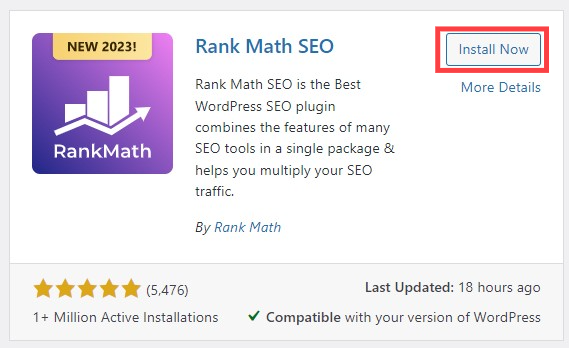
Step 4: Once the Rank Math plugin has been installed, click on “Activate”.
Confused?
Feel free to check our detailed guide for Installing any WordPress plugins.
Here is the simple guide to create a WordPress sitemap using the Rank Math SEO plugin for WordPress.
Step 1: After the plugin has been activated, go to “Rank Math” and then click on “Sitemap Settings”.

Step 2: In the “General” section, turn on the “Images in Sitemap”.
Step 3: Go to the “Post” option turn on the “Include in Sitemap” button.
Step 4: Do the same for the Pages by going to “Pages” from the left panel.

Step 5: Scroll down to the bottom and click on “Save Changes”.
Step 6: Go back to the “General” setting and click on given URL to view your Sitemaps.

That’s it! Your sitemap has now been created; and this is how your sitemap looks like:

Note: Its tricky to know what to include in the sitemap. Its not that we should include everything like pages, posts, images, tags, categories, attachments, etc on the sitemap. Generally it is advised to include posts, pages and categories for small sites. For more details on this you may want to check Google Search Central say on Sitemaps.
After creating the WordPress sitemap, you should submit it to Search Engines (Example: Google Search Console). Submitting your sitemap to search engines allows you to provide additional information about your website, such as when each page was last updated and how frequently it changes.
Here’s a step-by-step guide to submit your WordPress sitemap to the Google Search Console:
Step 1: Login to the Google Search Console.
Step 2: Click on “Sitemaps” on the left navigation panel.
Step 3: Copy the sitemap URL from your WordPress [Sitemap Settings].
Step 4: Paste it in the text field below “Add a new sitemap”
Step 5: Click on “Submit” button.

Here are some more tips to keep in mind while creating WordPress sitemaps with Rank Math:
All types of sitemaps serve the same primary purpose of the sitemaps. However, in terms of SEO, XML sitemaps are considered the best option as they provide a complete and detailed list of pages that search engines can crawl and index.
There are several sitemap plugins available for WordPress including Rank Math SEO, Google XML Sitemaps and Yoast SEO. Among these, Rank Math SEO is the best sitemap plugin for WordPress. It is easy to use and has all the features you need to create a sitemap for your WordPress site.
First install the Rank Math SEO plugin on your WordPress site, activate it and go to “Rank Math” > “Sitemaps Settings”. Enable the Sitemap setting by toggling the button to “On”. Now save the settings by clicking on “Save Changes” button. Your sitemap has now been created, you can configure other settings according to your needs.
Submitting your sitemap to Google Search Console is a very simple process. First login to the Google Search Console account, on the left-hand panel click on “Sitemaps” under the “Index” section, Paste the sitemap URL in the text field and click on the “Submit” button.
In conclusion, creating a WordPress sitemap with Rank Math SEO is the best practice for improvement in optimization of website to rank your website more effectively. With Rank Math SEO, you can automatically generate a sitemap and submit it to search engines.
There are a number of SEO benefits that come with the Rank Math SEO. For starters, it helps to organize your website in a way that is more search engine friendly. This can lead to better indexing and ranking of your website major search engines. By following the steps, you can create a sitemap for your WordPress site in no time and take the first step towards better SEO